Suppose your application needs products matching "protein bar" at a particular delivery location. The capability exists, its inputs are known, and your code knows when to call it. A REST API is the straightforward fit.
Now change the request: "Find protein bars available near me, compare the options, and work out which data source you need." Before it can fetch anything, the application needs help deciding which capability is relevant. That is where the Model Context Protocol, MCP, earns its place.
The data operation has not changed. What changed is the part that decides what happens next.
Start with a REST API when your software already knows the operation. Start with MCP when the model should discover and choose the capability.
Treat that as a starting point, not a protocol rule. The host application still controls what may run, and the MCP tools specification says implementations are free to expose tools through whatever interaction pattern suits them.
That is also why "MCP vs API" is a slightly misleading comparison. API is the broad category, REST is an architectural style for building one, and MCP is a specific protocol for connecting AI applications to tools. They are not two wire formats competing to replace each other. This guide compares them where the choice is real: a REST API called by your code, or tools the model chooses over MCP.
Start with the operation, not the agent label
Picture a capability called search_products(query, location).
In the application-controlled version, a user types "protein bar" and picks a delivery location. Your backend already knows the next step is a product search. It validates the input, calls the known REST operation, checks the result and sends the relevant records to the screen.
The model does not need to choose the source, invent the request or read every returned row. A comparison screen can render the results directly and a database can store them. A model can get a small selection afterwards to explain the differences.
You still need orchestration: deadlines, retries, storage, pagination and what to do with incomplete results. In this design those belong to code you can test without a model in the loop.
That stays true inside an AI product. A research assistant might always fetch an account's approved product list before asking a model to reason about it. The fetch is a fixed step, even though the wider workflow involves an agent.
Nor does REST mean an undocumented collection of URLs. OpenAPI describes operations, parameters, request bodies and responses as a machine-readable contract. The difference is not "MCP has schemas and REST does not".
What changes when the model chooses the next step
Go back to the open-ended request about nearby protein bars. Say the system has product search, product detail and location capabilities. It has to work out which source covers the user's location, whether search results are enough to compare, and whether another lookup is needed.
MCP gives an application a standard way to discover and call tools a server provides. A client sends tools/list; each tool comes back with a name, a description and a JSON Schema inputSchema, optionally with an outputSchema. The client then calls the chosen tool with tools/call. Those are protocol operations, not scraping operations.
The roles matter:
The model proposes a tool and its arguments.
The host application runs the conversation and decides what is allowed.
An MCP client inside the host talks to an MCP server.
The server exposes the capability and does, or delegates, the work.
A host can hold several clients connected to different servers, and it never hands its security boundary to the model. This split comes from the MCP architecture.
In our example the host shows the model suitable tools. The model proposes a product search using the location from the conversation. The host checks the proposal, the client sends it, and the server calls the product-data service. The host then decides what to do with the result: pass it to the model, transform it, store it, or stop because a required condition was not met.
The location still has to come from somewhere. "Near me" does not authorise guessing a pincode or collecting a location silently. And finding a tool called product search does not prove its source covers the user's market.
A second lookup now has a reason: the first result lacked a field the comparison needs. That is a useful model-made choice. Asking the model to pick the same known operation on every request is a different proposition.
One detail from older comparisons needs correcting: MCP does not give you conversation memory. The current protocol is stateless; every request carries what the server needs to handle it. The host's conversation state and the data service's job state are separate concerns. Do not design around "REST is stateless and MCP remembers".
MCP vs function calling
A model can also choose an ordinary function tool whose implementation calls REST. In a function-calling flow, the model produces a structured request, your code runs it and passes the result back for the next step.
That gives the starting rule two important exceptions:
One application, a few stable tools. Function calling backed by REST may give you all the dynamic selection you need. Adopting MCP only because a model chooses the operation can add a protocol without solving an interoperability problem.
A known operation, many hosts. An operation your code already knows can still be worth exposing over MCP when several MCP-compatible clients need it. Reusing one standard discovery and calling interface can matter more than whether a given call was chosen dynamically. Check client compatibility, supported features and authorisation.
There is also no need to put every tool definition into every prompt. A host can filter what it exposes; OpenAI's remote MCP documentation, for example, describes an allowed_tools parameter to import only some of a server's tools. How much context discovery costs is an implementation choice, not a fixed property of MCP.
So keep the questions apart. Function calling is how a model asks for an action. MCP standardises access between a host's client and a tool server. REST can stay the interface that performs the action underneath. They compose; they do not replace each other.
The MCP server is not the scraper
For web data, the more useful question is what sits behind the interfaces. A tool called product search still needs a service that fetches source data, runs the job and returns a result. Putting an MCP server in front of that service does not by itself improve coverage, freshness, extraction accuracy or availability.
An MCP server might call an existing REST API. Or REST and MCP handlers might both call the same internal service. Neither arrangement needs a second copy of the scraper.
Upscrape takes the second approach: its REST and MCP interfaces share one registered catalog and execution plane.
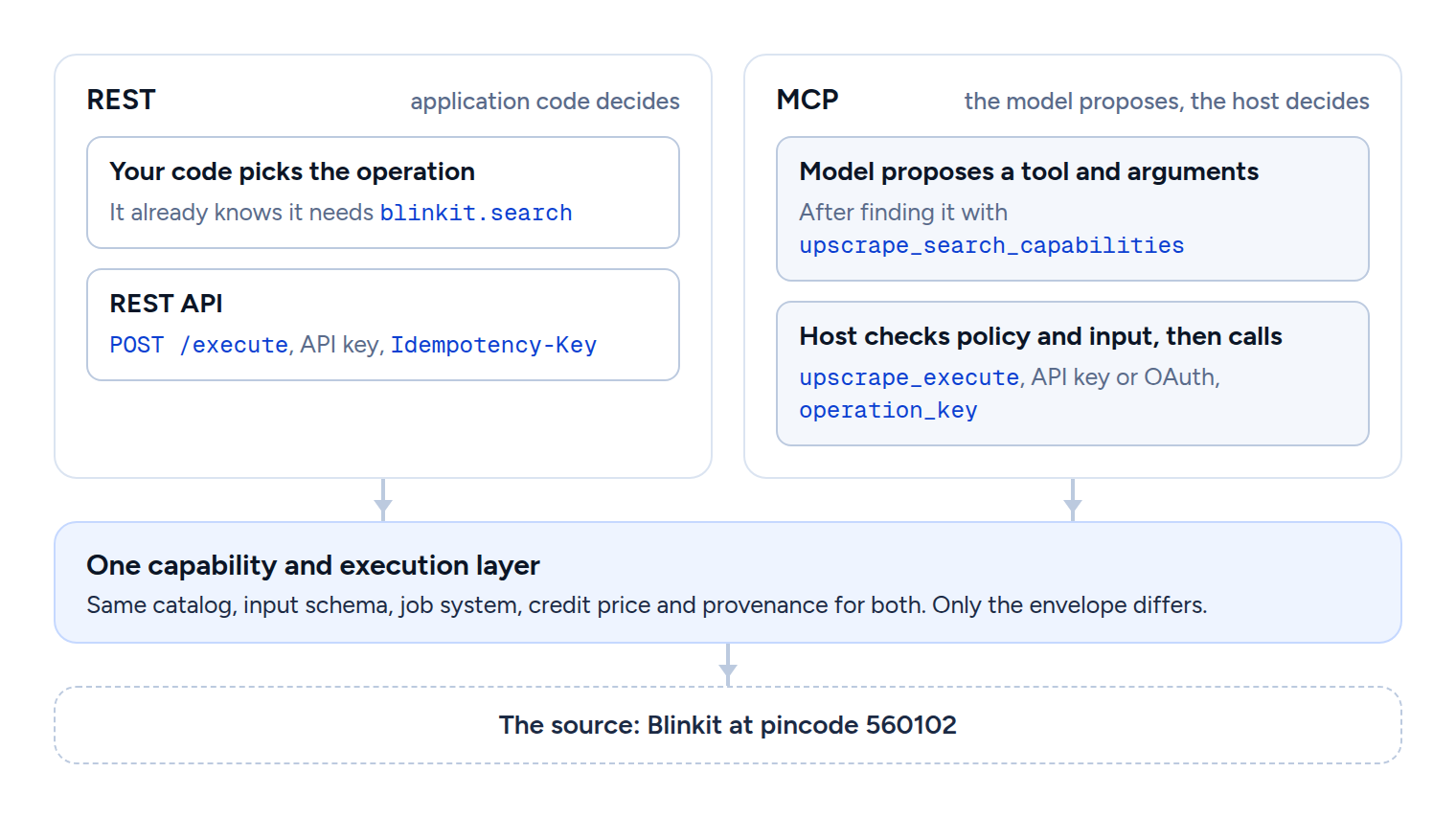
Sharing execution does not make the two contracts identical. Authentication, request envelopes, result presentation and client behaviour can differ even when the operation is the same. The next section shows exactly how much.
MCP vs API in practice: one search, run both ways
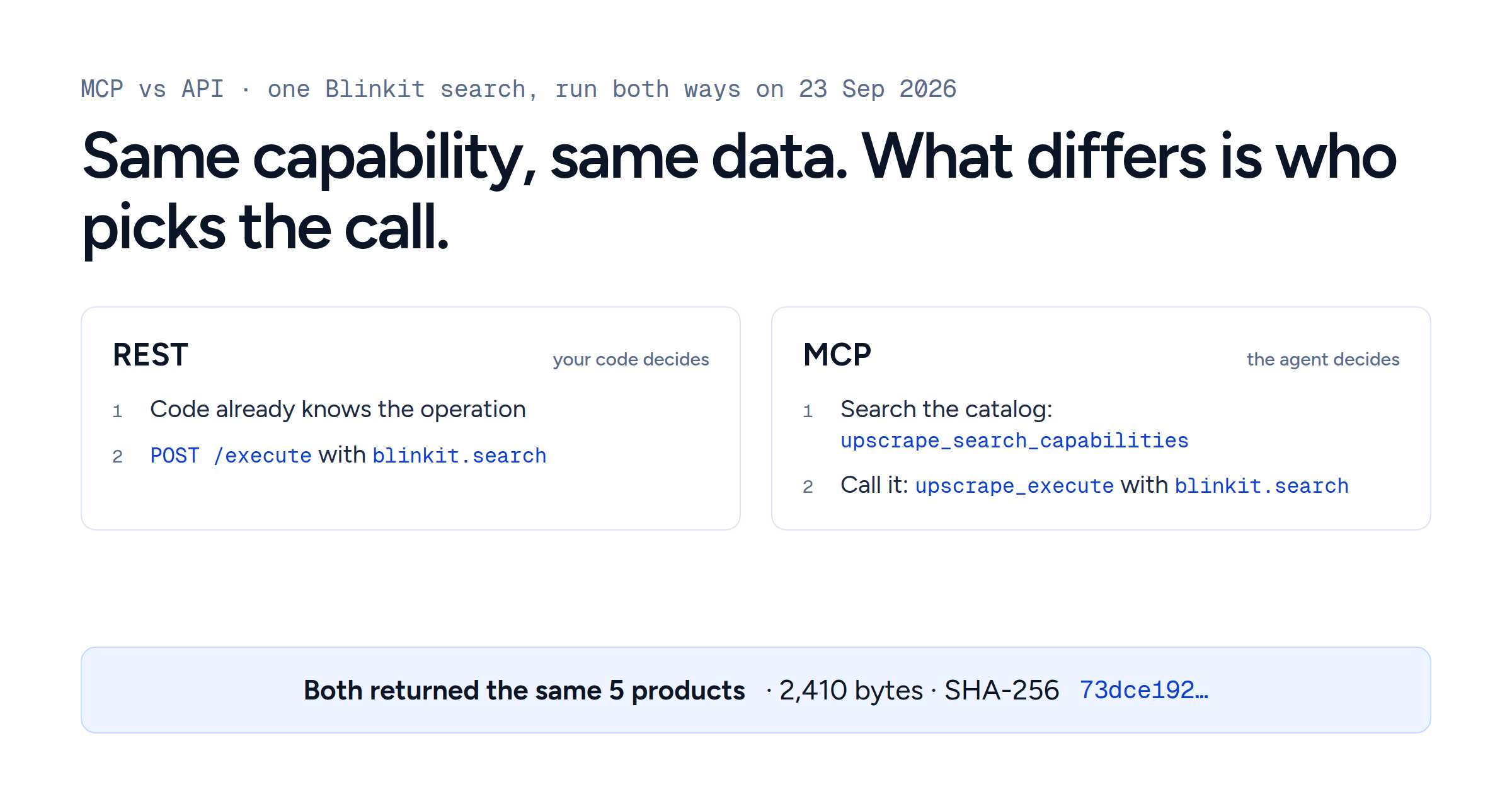
On 23 September 2026 we ran the same Blinkit product search twice: once over REST, as a backend would, and once over MCP, as an agent would. The request asks for five protein bars at pincode 560102 in Bengaluru, using the blinkit.search capability.
Over REST, the capability and its input go in the body of the shared POST /execute endpoint:
curl --request POST \
  --url https://data.upscrape.com/execute \
  --header "Authorization: Bearer YOUR_API_KEY" \
  --header "Content-Type: application/json" \
  --header "Prefer: wait=30" \
  --header "Idempotency-Key: blog-mcp-vs-api-rest-run-20260923" \
  --data '{
    "capability": "blinkit.search",
    "input": {
      "query": "protein bar",
      "pincode": "560102",
      "limit": 5
    }
  }'
Over MCP, the same capability ID and input become the arguments of the generic upscrape_execute tool:
{
  "name": "upscrape_execute",
  "arguments": {
    "capability": "blinkit.search",
    "input": {
      "query": "protein bar",
      "pincode": "560102",
      "limit": 5
    },
    "max_credits": 1,
    "operation_key": "blog-mcp-vs-api-mcp-run-20260923"
  }
}
The two runs were separate executions, started about 20 seconds apart:
| REST | MCP | |
|---|---|---|
Who chose blinkit.search
| Our code, in advance | The agent, after searching the catalog |
| Retry key |
Idempotency-Key header
|
operation_key argument
|
| Job |
49977599-…, completed
|
9950786a-…, completed
|
| Result | 5 products, 2,410 bytes | 5 products, 2,410 bytes |
| SHA-256 of the result |
73dce192…
|
73dce192…, identical
|
| Price | 1 credit (the 1 to 12 product tier) | 1 credit (the same tier) |
| Envelope also carries | job, stats, billing, outcome |
the same, plus collected_at, _provenance, result_complete
|
The data was byte for byte the same: the same five products, in the same order, at the same prices, stock and store. What differed was the envelope around it, and one step that only the MCP path had.
The step REST skips: discovery
Upscrape's default MCP interface exposes four tools, not one per scraper: upscrape_search_capabilities, upscrape_describe_capability, upscrape_execute and upscrape_get_job_result. An agent searches the catalog for a suitable operation, reads its input contract when it needs to, and runs it. Searching the catalog is not searching the web; it finds a tool the account can use to do the work.
How the agent phrases that search matters. Two searches of the live catalog on the same day:
| Catalog search | Matches |
Where blinkit.search came
|
|---|---|---|
| "protein bar prices and stock at an Indian pincode on a grocery delivery app" | 110 | Not in the top 10 |
| "search blinkit products by keyword" | 278 | First |
The vague task still surfaced five Blinkit capabilities in its top ten (category listings, product detail, location, delivery times and categories), but not the search itself. The specific phrasing found it first. Discovery is a real decision with real room for error, which is exactly why software that already knows blinkit.search should not ask a model to rediscover it.
There are two levels of discovery here. MCP exposes the small set of tools; Upscrape's search tool picks a business capability inside the catalog. That is different from assuming tools/list returns one tool per scraper. For clients that benefit from direct tools, Upscrape also supports pinned capabilities and larger catalog profiles.
When an interactive search becomes an hourly pipeline
Suppose the comparison works, and the next requirement is to check an approved product list at chosen locations every hour and keep the observations.
An agent can help set that up: suggest sources, interpret the request, propose a collection plan. But once someone approves the source, the product IDs, the locations, the schedule and the budget, those choices belong in configuration.
The scheduler should not need a model to rediscover product search every hour. Code can submit the known operations, track the jobs, store the results and work out what changed. Here REST is the simpler default because the task no longer involves open-ended choice, not because REST is inherently faster or more reliable. Our Blinkit price-tracker guide builds exactly that kind of daily job in Python.
Keep both side by side. The interactive agent uses MCP to investigate a new request. The recurring collector uses REST to run an approved plan. Later, an agent can read the stored observations to explain what changed, without collecting everything again.
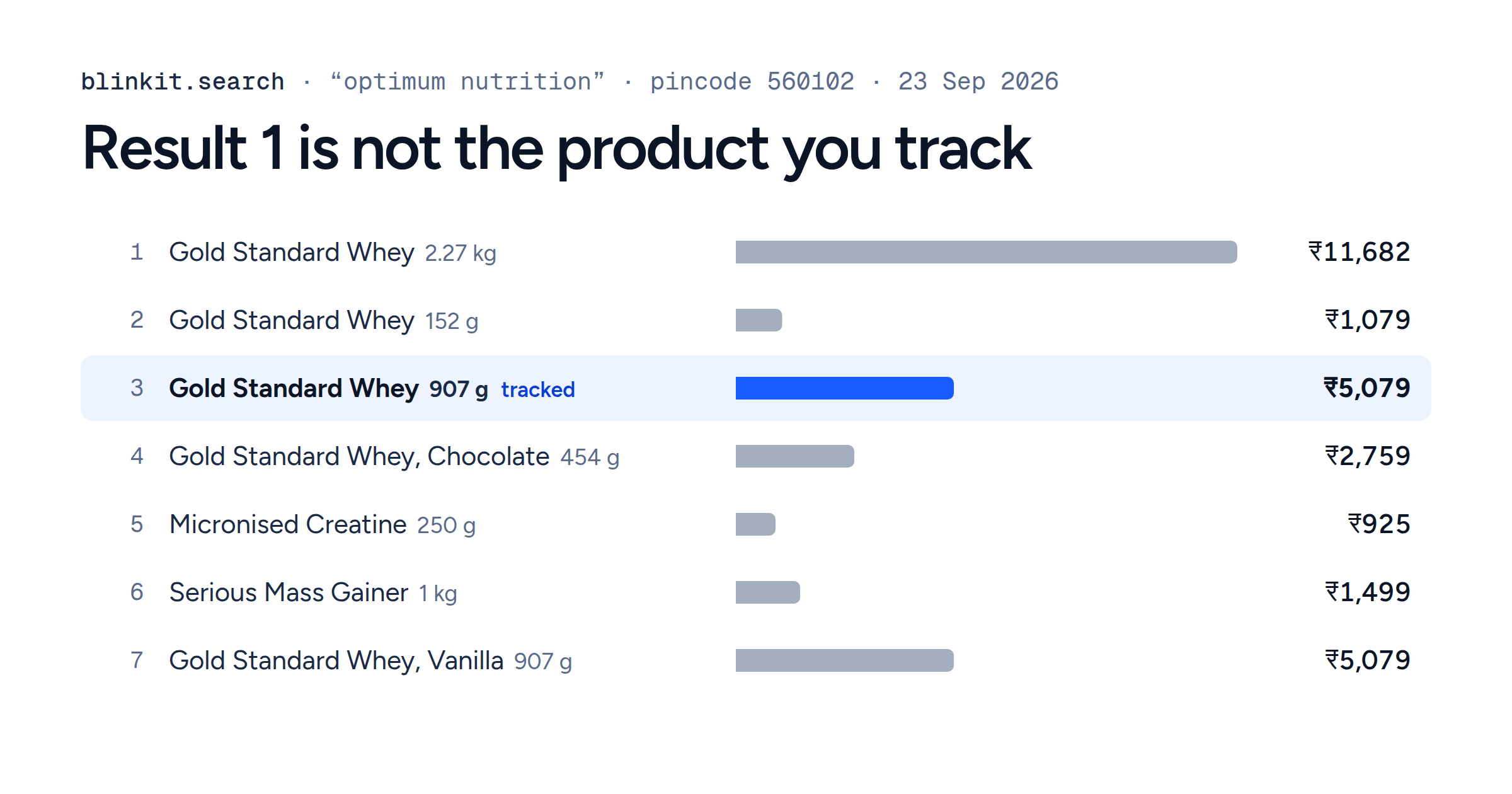
This is also where a quick product search stops being a monitoring plan. Finding several matches does not establish a stable product list, complete geographic coverage or a consistent identity across runs. A production plan has to define those separately.
MCP is not limited to short, synchronous calls. The protocol has an optional Tasks extension for long-running work, and services can expose their own job interfaces; Upscrape's MCP job tools handle pending runs and later retrieval. Check what your client and server actually support rather than assuming a provider's job tools implement the Tasks extension.
Decide separately whether the data belongs in the model's context
Choosing an interface does not answer where the result should go.
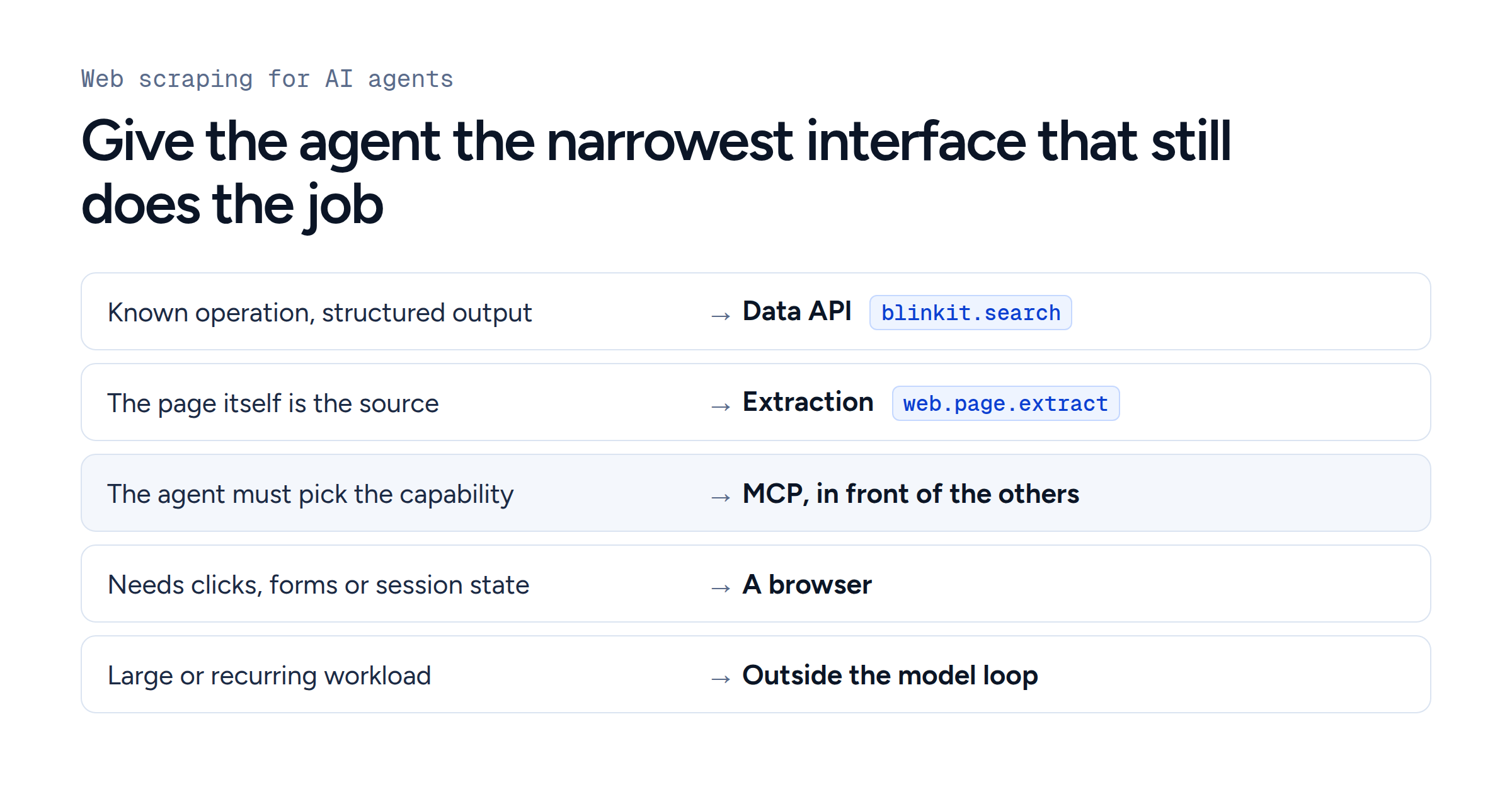
A handful of product records is fine evidence for a conversational comparison. A recurring dataset across many products and locations is a different workload. Send the raw observations to a database or object store, validate and aggregate them in code, and give the model the rows or figures its question needs.
MCP does not force the model to read every byte. Anthropic's code execution with MCP shows agents filtering and transforming tool results in code before returning them; in its worked example, token use falls from 150,000 to 2,000. On the Upscrape side, MCP results are previewed up to 24 KiB by default and marked as truncated beyond that, and the complete stored result can still be read over the same MCP connection in chunks. You do not have to switch to REST to get the full data. Our web scraping for AI agents guide measures the difference on a real 50-product search: 23,346 bytes in full, 222 bytes for the answer.
Keep three questions apart:
Did the job complete?
Did the consumer read the full result it needed?
Did the query cover the population the answer claims to describe?
A completed five-product search does not justify "these are all the protein bars available nearby".
Production behaviour matters more than the label
Track the job, not just the call
A successful submission is not always a finished dataset. Over REST, a completed request returns HTTP 200 and a pending one returns 202 with a job you poll at GET /jobs/{id}; over MCP, the equivalent is upscrape_get_job_result.
Store the job ID, and keep submission retries separate from status polling. A timeout on your side does not prove the job stopped. Otherwise "retry" can quietly mean "collect twice".
Both interfaces carry a retry identity: REST's Idempotency-Key and MCP's operation_key. Follow each one's documented contract, and use a new key for an intentional new observation rather than replaying an old job forever.
In the collector, record the capability, the relevant input, the job ID, its final state, the collection time and where the result is stored. In the agent host, also record the proposed tool, the accepted arguments and the authorisation decision. That lets you tell a wrong choice from a failed run or an incomplete read. Collection time is when you looked, not when the source last changed.
For high volume, set worker concurrency, per-run budgets, bounded retries and alerts for runs that did not happen. Those are operating policies, not decisions to leave to an open-ended tool loop.
Validate the evidence you use
An input schema constrains the shape of a request. It does not prove the model picked the right location, source or meaning of "available". Structured output is useful without being a guarantee of complete coverage.
The blinkit.search reference deliberately leaves the platform payload open-ended rather than freezing its sample as a fixed schema. Validate the fields your application depends on, and keep uncertainty visible when evidence is missing. A pending job, a failed fetch, a missing field and an explicit out-of-stock result should never collapse into the same business value.
Keep discovery separate from permission
Letting a model propose actions makes permission boundaries more important, not less. The host controls which data leaves the application and which actions go ahead; the MCP tools specification recommends a human in the loop who can deny tool calls.
For Upscrape, REST uses an API key, while MCP accepts an API key or OAuth. That is a product detail, not a rule that REST cannot use OAuth.
Hiding tools is not authorisation either. Upscrape's docs note that pinning tools does not restrict access through the generic execution tool. Use credential permissions or OAuth scopes instead of relying on the model seeing a shorter list.
Retrieved product text, reviews and page content stay untrusted. They must not authorise unrelated tool calls or writes, and Upscrape marks every MCP result as untrusted data for that reason. Read-only collection should never quietly become permission to buy, publish or change anything.
Measure the path you will actually run
Do not infer speed or cost from the labels REST and MCP. Compare the workflow you intend to run: discovery, model selection, approval, execution, polling, transfer and post-processing.
Extra model decisions can add work, but a known MCP call does not have to repeat discovery. Equally, a REST-backed agent can take several model turns before it sends a request. A fair comparison fixes the task and measures those steps; a protocol name is not a benchmark.
Choose per consumer, not once for the whole system
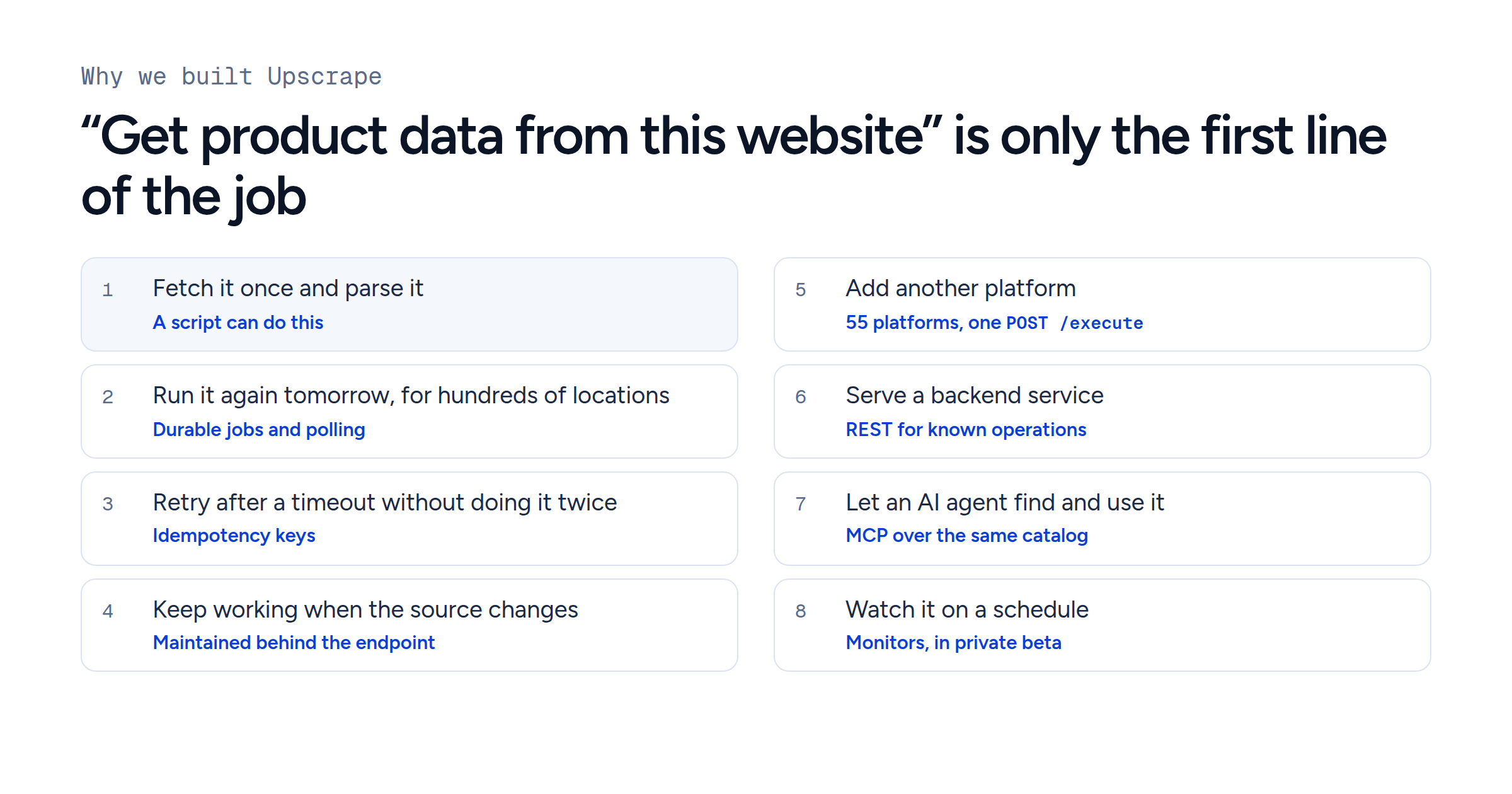
For a product-search feature, start with REST when the application has already chosen the operation and its input. For an exploratory agent, consider MCP when discovering capabilities, and reusing one integration across hosts, solve a real problem. For a stable set of custom tools in one application, function calling backed by REST remains a good choice.
When exploration turns into a recurring job, save the approved plan and move the repeated work into ordinary code. Keep large datasets out of the model's context unless the model needs them.
The useful question is not "which protocol wins?" It is "which consumers should reach this capability over REST, and which over MCP?" One execution layer can serve both, as the run above shows, without forcing every consumer down the same path. That is the idea behind how Upscrape is built.