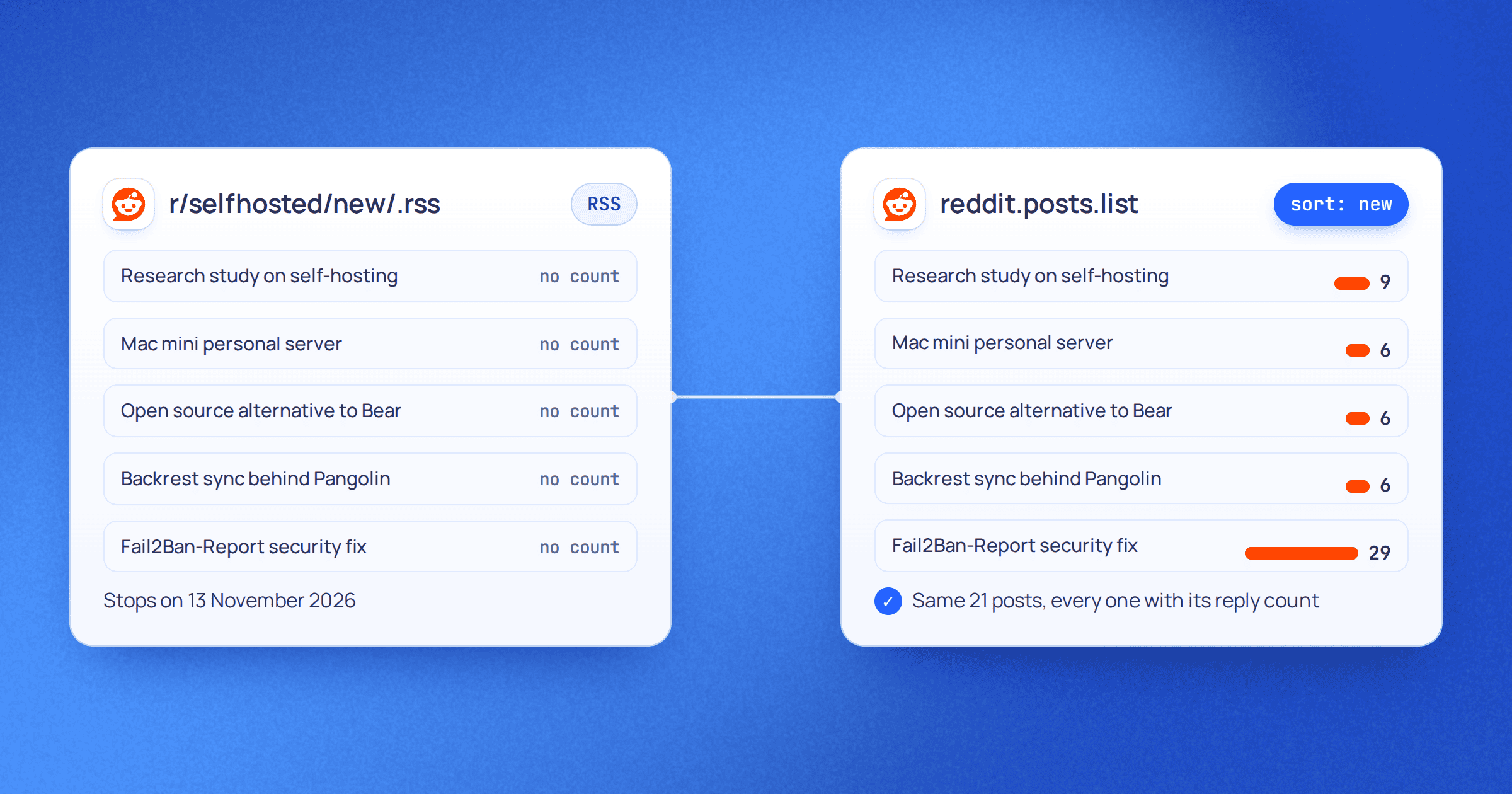
Ask an AI agent which protein bars are available for delivery to a particular pincode right now.
A person would open the grocery app, set the delivery address, type "protein bar", scroll the results and note the prices and stock.
It is tempting to give the agent a browser and have it repeat exactly that sequence.
But the agent does not need the browser. It needs the information the sequence produces: a location, a query, the matching products, their prices and whether they are in stock.
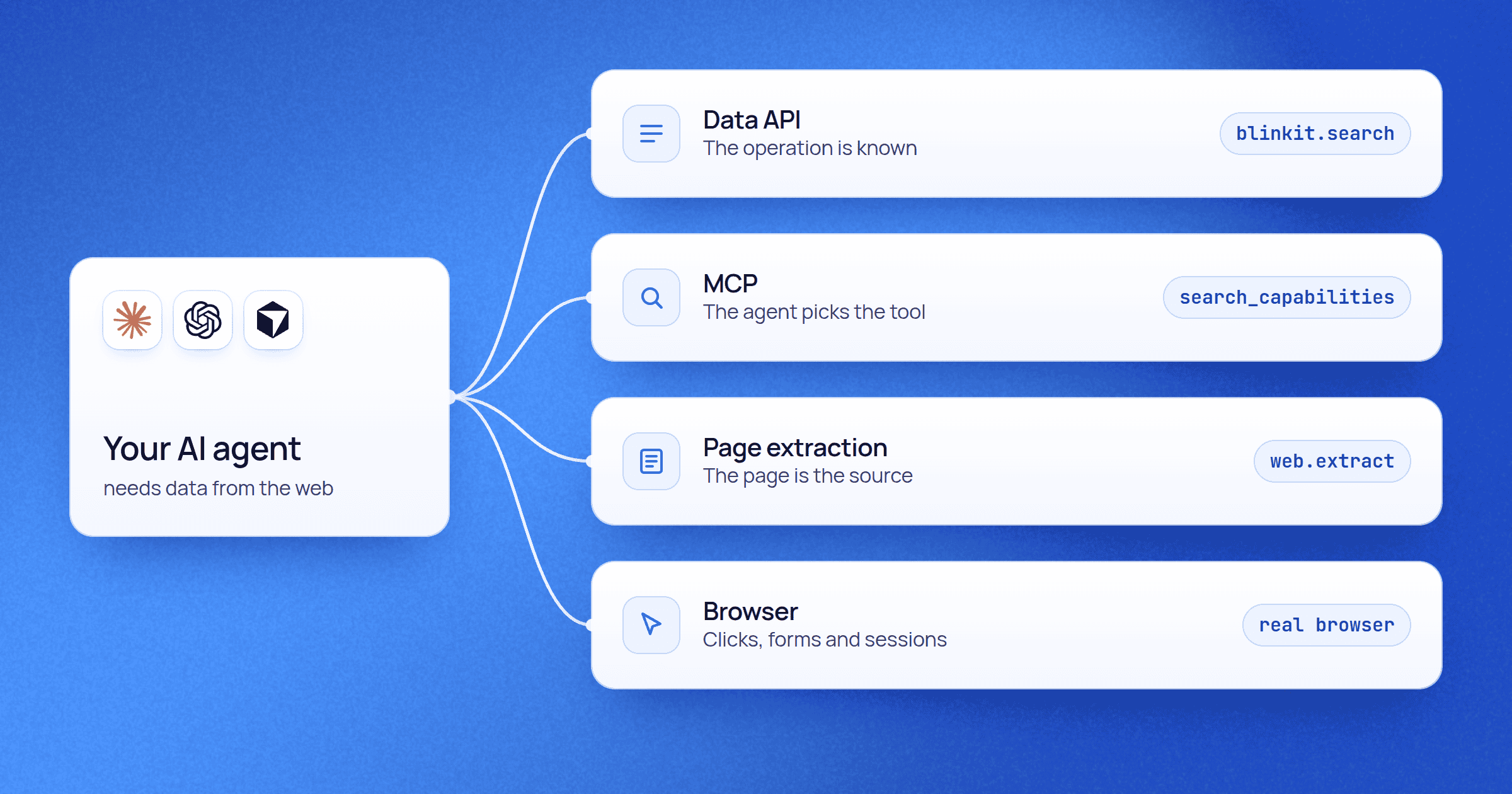
If a structured API already returns those, making a model drive the human interface adds a layer and nothing else. If the agent has to choose among several data capabilities, MCP can help it find and call the right one. If the useful source is an article or a product page, page extraction may be enough. And if the task really depends on a signed-in session, clicks, forms or visual state, a browser is the right tool.
That is the useful way to think about web scraping for AI agents:
Give the agent the narrowest interface that still preserves the information and actions the task needs.
APIs, MCP, extraction and browser automation are not successive generations of one technology. They solve different parts of the system.
Two decisions hide inside "API, MCP or browser?"
Architecture discussions often start with one question: should our agent use an API, MCP or a browser?
That question mixes two decisions.
The first is how the information is collected or the action carried out: through the platform's own API, a structured data API, a page extractor or a browser.
The second is how the AI application reaches that capability: your code calls it directly, the model calls it as an ordinary function tool, or the agent discovers it through MCP.
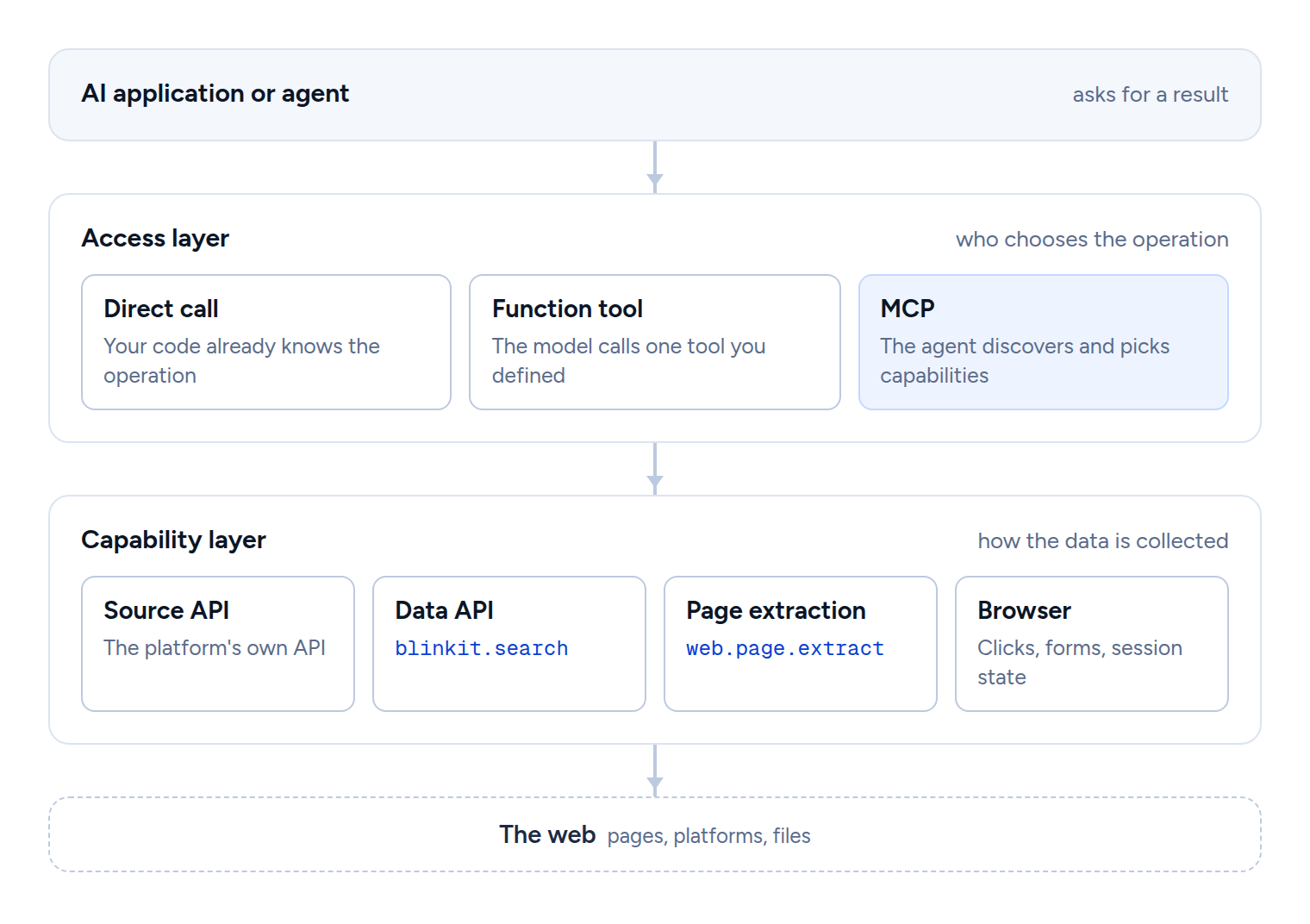
That is why "MCP versus API versus browser" is not quite the right comparison.
The Model Context Protocol architecture overview describes MCP as a protocol for exchanging context between AI applications and servers. Servers expose three core primitives (tools, resources and prompts), and a tool can perform "file operations, API calls, database queries". The same page is explicit about scope: MCP focuses solely on the protocol for context exchange and does not dictate how AI applications use LLMs or manage the context they receive.
So one MCP tool can call a data API, another can drive a browser, and an extraction service can render pages internally. A domain-specific data API can be offered over REST and MCP at the same time. None of these designs contradict each other. They sit in different layers.
Use a structured API when the operation is already known
Suppose your application always needs the same thing: search a grocery platform for "protein bar" at pincode 560102 and return the current products, prices and stock.
If the platform, or a data provider, offers a structured API for that, it is usually the cleanest interface.
Your application already knows the operation. There is little value in asking a model to work out which endpoint to call every time. Code can supply the query and location, validate the response, retry known failures, store the result and show the model only the records it needs.
That gives you an important property in production: the model does not own a decision the application has already made.
The same holds outside commerce. If an agent always needs a flight status, a company-register lookup, a weather reading or a known database query, the fact that an LLM writes the final answer does not make the data collection agentic.
A platform's own API has limits. It may not expose the data you need. Its coverage can differ from the consumer app. Location-specific availability, search ranking or promotions may be missing. Many sources have no suitable public API at all.
That is where a structured data API becomes a separate option.
A data API is still an API from the agent's point of view
A data API, sometimes called a scraping API, moves the unstable collection work behind a structured request.
Instead of telling an agent to open the site, set the location, find the search box, type the query, wait for results, read every product card and parse the page, the application asks for what the task needs:
curl --request POST \
--url https://data.upscrape.com/execute \
--header "Authorization: Bearer YOUR_API_KEY" \
--header "Content-Type: application/json" \
--header "Prefer: wait=30" \
--data '{
"capability": "blinkit.search",
"input": {
"query": "protein bar",
"pincode": "560102",
"limit": 50,
"max_pages": 5
}
}'
The provider owns more of the collection problem: access to the source, fetching or rendering, retries, parsing, normalising and keeping up as the site changes. The caller does not need to know whether a request used plain HTTP, the platform's internal endpoints or a browser. What matters at the boundary is the operation and its result.
When Upscrape ran this search on 23 September 2026, one request returned 50 products, each with its brand, name, pack size, price, MRP, inventory, serving merchant and position. The blinkit.search reference gives the price, which depends on how many products you ask for, and notes that the raw output is open-ended and can change with the upstream source rather than promising a frozen schema.
Now picture the same search every morning for 500 fixed query and pincode pairs. Having a model operate 500 browser sessions would add very little intelligence. It would mostly add orchestration and state. The structured call is the better abstraction for that workload, and the Blinkit price-tracker guide shows what that looks like as a daily Python job.
That does not make a data API better than a browser in general. It means the browser is unnecessary when the task can already be expressed as a narrower data operation.
MCP helps when choosing the capability is the agent's job
Change the request: "Research protein bar options for delivery to this area. Check the relevant stores, compare what is available, and use other web sources if you need more context."
The application no longer knows in advance which operation will answer it. One step may need a location resolver, another a product search, another a page extraction, another a different platform altogether.
This is the problem MCP is well suited to: presenting a bounded set of capabilities in a form the AI application can discover and call. An MCP client can list a server's tools (tools/list) and read each tool's name, description and input schema before calling it (tools/call).
So MCP is useful when choosing the tool is itself dynamic. It has not replaced the data collection underneath. If an MCP tool ends up running a maintained data API, MCP is the agent-facing interface and the data API is still the collection layer.
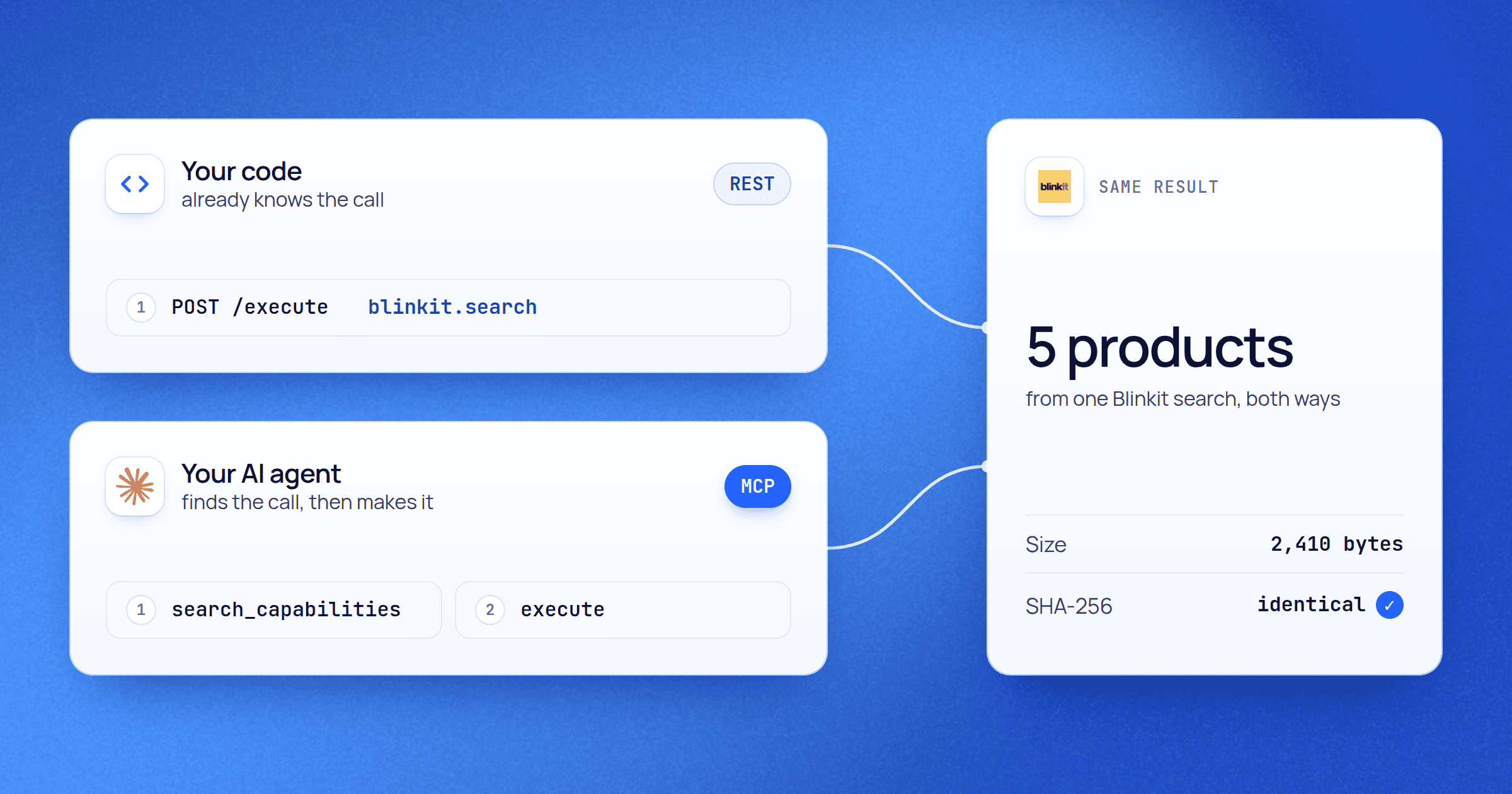
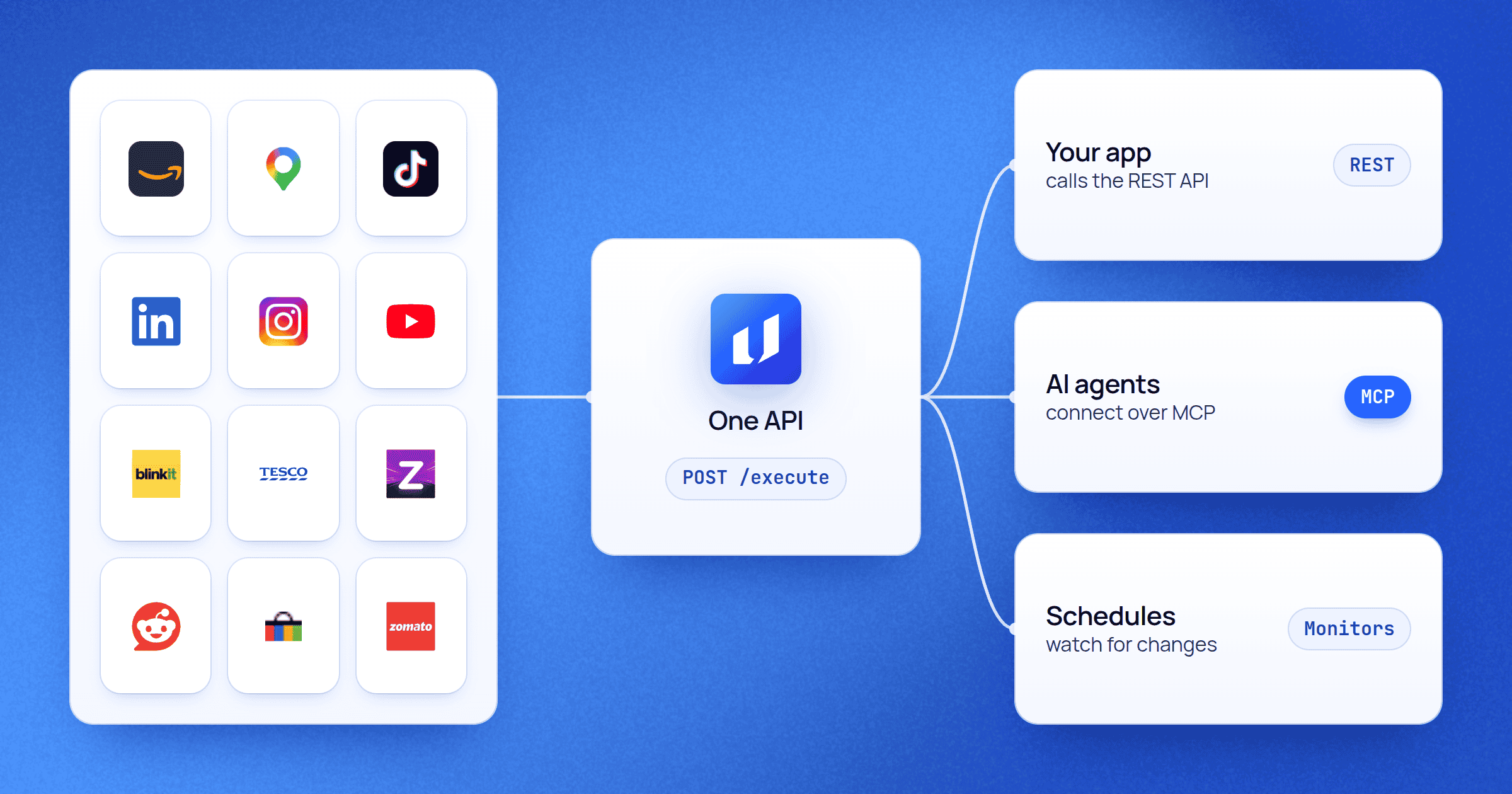
Upscrape's own setup shows that separation. Its REST or MCP guide states that both surfaces use the same registered catalog and execution plane, and that the choice depends on who owns orchestration, not on output quality. The account, catalog visibility, input schema, execution, credit cost and provenance are the same on both. Over MCP, an agent gets four tools by default (search the catalog, describe a capability, execute, fetch a result) rather than one tool per endpoint.
This is the same protein bar search as the REST call above, made by an agent through the upscrape_execute tool:
{
"name": "upscrape_execute",
"arguments": {
"capability": "blinkit.search",
"input": {
"query": "protein bar",
"pincode": "560102",
"limit": 50,
"max_pages": 5
},
"collection_path": "/results",
"fields": ["/rank", "/product_id", "/brand", "/name", "/variant",
"/price", "/mrp", "/inventory", "/is_sold_out", "/merchant_id"]
}
}
The capability, input and cost are identical; collection_path and fields only trim what comes back. What changed is who chose the operation: here the agent found blinkit.search in the catalog and decided to call it. If your backend always knows it wants blinkit.search, calling it over REST is simpler. If the agent has to decide between Blinkit search, location resolution, page extraction or something else, exposing the catalog through MCP is more useful.
The web work did not become "MCP scraping". MCP changed who picks the operation and how it is presented to the model.
Use page extraction when the page itself is the source
Not every web-data problem deserves a domain-specific API.
Picture a research agent looking into a company. It finds a press release, an investor-relations page, a documentation page and a regulatory notice. In each case the page or document is the useful source. You need its clean text, title, tables, links or a handful of fields. You do not need a purpose-built "press release API", and once you have the URLs you certainly do not need a model clicking around a browser.
That is the job of generic page extraction: give it a URL and the shape of the data you want, and get back the content or the fields.
Upscrape's web.page.extract takes a public URL plus either a JSON Schema or plain-language field descriptions, and has an optional browser fallback. On 23 September 2026 we pointed it at the MCP architecture page cited above:
{
"capability": "web.page.extract",
"input": {
"url": "https://modelcontextprotocol.io/docs/learn/architecture",
"fields": {
"title": "the page's main heading",
"server_primitives": "the core primitives that MCP servers can expose"
},
"allow_browser_fallback": true
}
}
| What came back | Value |
|---|---|
title
|
Architecture overview, from the page's JSON-LD and its h1
|
server_primitives
| Tools, Resources, Prompts, from the sentence that lists them |
| HTML read to get there | 714,779 bytes, about 28,000 characters of text |
| How the page was captured |
Plain HTTP (capture_backend: http)
|
| Rendered in a browser |
No (rendered: false), although the fallback was allowed
|
The agent received two fields with their evidence instead of 700 KB of markup. And although a browser fallback was allowed, the service decided it did not need one. That is the architectural point: browser technology can live inside the collection system without browser control becoming the interface the agent sees.
A JavaScript-heavy page does not automatically mean a model has to control Chrome. Often you only need an extraction service that can render the page before returning its content. Use a browser because you need interaction or state, not merely because a page runs JavaScript.
Use a browser when the interface is part of the task
Some workloads lose something essential when reduced to a fetch or an API call.
Suppose the request changes from "which protein bars are available?" to: "Using my signed-in session and saved address, apply these filters, check the current options, add the chosen pack to the cart and tell me what the checkout screen shows before I pay."
Now state and interaction matter. The task may depend on an authenticated session, a location stored in the interface, a multi-step flow, controls that change as you use them, or an action with no lower-level equivalent.
That is where browser automation, or computer use, belongs. OpenAI's computer use guide describes it in exactly these terms: it "lets a model operate browser and desktop interfaces", to "fill out forms, test user flows, or complete tasks in applications through their UI". It also tells you to keep the browser or desktop session alive between calls, because later actions depend on earlier state.
A browser gives an agent something an extraction endpoint does not: an interactive state machine.
The cost is more state to manage. Actions happen over many steps. The rendered interface becomes part of what can break. A run can land on an unexpected dialog or page. You may need screenshots, action traces, time limits, recovery logic and explicit checks before anything consequential.
That overhead is justified when the task really depends on the interface. It is waste when the answer was a structured dataset all along.
A practical comparison
The mechanisms are easier to choose between when you compare the job each one does, rather than treating them as rival agent technologies.
| Mechanism | Best fit | Who usually picks the operation | What the caller gets | Main concern |
|---|---|---|---|---|
| Platform's own API | The source already exposes the operation | Application code | Structured data defined by the source | Coverage and the source's terms |
| Data API | The operation is known, and collecting it from the public web should be handled for you | Application code or an agent tool | Structured platform data | Upstream changes, the provider's contract, provenance |
| MCP | The agent should discover or choose among capabilities | The agent and its host | Tool descriptions and tool results | Tool choice, permissions, context, orchestration |
| Page extraction | A page or document is the source | Application or agent | Clean content or fields you define | Page variety and extraction quality |
| Browser automation | The task depends on UI interaction, session state or UI-only actions | Code or the model | Observations and state changes | More state, more steps, more ways to fail |
MCP is deliberately the odd row. It can sit in front of any of the others: a browser, a data API or a page extractor can each be offered as an MCP tool.
Production systems end up hybrid
Agent demos often start with one model and one browser. That is understandable: a browser is extremely general, and generality helps when you are proving an agent can finish a task at all.
Production changes what you optimise for. Once a path repeats, you can make it narrower and more predictable.
Take the protein bar example. An interactive research assistant can reach a data provider through MCP, because the model has to work out whether it needs product search, location resolution or something else.
Now suppose the same searches must run at 6 a.m. every day across hundreds of pincodes. There is little reason for a model to rediscover the same operation hundreds of times. A scheduled backend can call the API directly, handle retries and job state, store the results, and make them available when someone asks the agent a question. Upscrape's REST and MCP guidance draws the line in the same place: REST when your code owns persistence, scheduling, batching, retries and observability; MCP when the agent does the discovery.
Both systems still use the same underlying capabilities.
A research workflow can be hybrid for a different reason. The agent searches for sources, extracts the pages it finds, calls a structured API wherever a domain-specific one exists, and saves the browser for the few sources that truly need interaction.
The useful question is not which single tool wins. It is where each tool stops being the simplest adequate one.
Model context is not your data pipeline
Giving an agent web data does not mean every record should pass through the model's context window.
Picture collecting 100,000 product records, crawling hundreds of pages or comparing thousands of search results. The data layer should fetch, filter, aggregate, deduplicate, validate, store and retrieve those records without the model reading every intermediate object. The model should receive what it needs for the decision in front of it.
Here is how much that matters for a single question, "which brands appear for protein bar at this pincode, and is Nature Valley one of them?", measured on the real search above:
- Full result 50 products, up to 15 fields each 23,346
- Five fields per product rank, brand, name, pack size, price 5,796
- The answer brand counts, and whether Nature Valley appears 255 About 1% of the full result
The full result is 23,346 bytes, and 8,252 of them are image and product URLs the question never uses. Nature Valley was not among the 50 results.
Source: Upscrape blinkit.search, query “protein bar”, pincode 560102, 23 September 2026. Sizes are compact JSON bytes of the verified result.
Agent tooling increasingly builds this in. Anthropic's programmatic tool calling lets Claude call tools from code "rather than requiring round trips through the model for each tool invocation", which "decreases token consumption by allowing Claude to filter or process data before it reaches the model's context window". On the data side, Upscrape's upscrape_execute tool accepts collection_path and fields, as in the MCP call above, so the server returns only the parts of a result the agent asked for.
The lesson does not depend on any one vendor:
Model context is for reasoning, not for storage or bulk transport.
For recurring web collection, a production system usually needs a database, object storage, a job queue or a scheduler, however the agent calls the first capability. MCP does not remove that infrastructure, and neither does a browser.
Reliability comes from removing choices that are not needed
Agents are useful because they can make decisions at runtime. But making every decision at runtime is not the same as building a good agent system.
If the application already knows a request should call one operation with a defined schema, letting a model first choose the operation adds a failure mode without adding useful flexibility. If a page can be turned directly into structured fields, having a model find the same fields in screenshots adds another loop that can go wrong. And if a UI flow really does require reasoning about changing state, hard-coding every path may break more often than letting a browser-capable agent adapt.
Good architecture puts model judgment where the variability actually is.
That improves several things at once. Structured operations have inputs and outputs you can validate. Workflows your application owns can apply deliberate retry and idempotency rules. MCP calls can be traced as discovery and selection decisions. Browser runs can keep their screenshots, actions, session state and outcome checks.
Instead of asking whether "agents are reliable enough to scrape the web", ask a narrower question: which parts of this task actually need agentic judgment? Everything else can stay ordinary software.
Security follows the same boundary
Web content is untrusted input, whether it arrives through an extractor, an MCP tool, a search result or a browser. That matters most when the same agent can both read arbitrary content and take actions. An instruction hidden in a web page must not be able to widen the agent's permissions, approve a purchase, reveal credentials or override what the user asked for.
OpenAI's computer use guide recommends an isolated browser or VM "and an allow list of sites and actions", treating screen content as untrusted because "text in a page, document, or tool result cannot grant permission or override the user's instructions", and confirming consequential actions such as purchases and destructive changes. On the data side, Upscrape marks every MCP tool result with provenance stating that the content is untrusted and must be treated as data, never as instructions.
The narrow-interface principle helps here too. A read-only product search exposes a far smaller action surface than an open browser session. That does not make the API automatically safe, but it leaves fewer capabilities to secure.
Grant the permissions the task needs, not every capability the runtime happens to support.
A decision model for AI agent web access
Start from the result the task needs, not from the interface a person would use.
| If the task looks like this | Start with | Upscrape example |
|---|---|---|
| The operation and its output are already known | A platform API or a maintained data API, called from your code |
blinkit.search over REST
|
| The useful object is a page or document | Page extraction, before giving a model control of the page |
web.page.extract
|
| Choosing the right capability is part of the agent's reasoning | MCP as the agent-facing layer | The four Upscrape MCP tools over the same catalog |
| It depends on sign-in, clicks, forms, multi-step UI or visual confirmation | Browser automation, isolated and with confirmations | Outside Upscrape: a computer-use or browser tool |
| It is large or recurring | Execution, storage and processing outside the model loop | Scheduled REST calls with results in your database |
Make the orchestration decision separately. If your application already knows the capability, call it directly. If working out the right capability is itself part of the agent's task, an MCP layer makes those capabilities discoverable and callable.
Then ask whether the work is interactive or operational. A one-off research question can reasonably stay inside an agent loop. A nightly job across thousands of records belongs in ordinary infrastructure, with the agent starting it, checking it or reasoning over its output rather than making every request itself.
These are defaults, not rigid categories. A page extractor may use a browser internally. An MCP tool may call an API. A browser may be offered through MCP. One production system may use all of them.
What actually works
The most durable architecture for web scraping for AI agents is not the one that gives the model the most general interface. It is the one that gives the model the right amount of agency at the right layer.
Use APIs when your software already knows the operation.
Use a data API when the task is structured but collecting it from the web should be maintained behind a contract.
Use page extraction when the page itself holds the evidence you need.
Use MCP when discovering and choosing capabilities is part of the agent's job.
Use a browser when the task really depends on the interface, interaction or session state.
Combine them when different parts of the workload need different things. The web may be where the information starts, but that does not mean the browser is where the agent has to start.